For most people, some of their information probably is on the dark web, because data breaches are constant. Check for free with Have I Been Pwned, which shows whether your email appears in known breaches. No service can remove leaked data or see the whole dark web, so the real defence is making leaked data useless: unique passwords via a manager, and two-factor authentication everywhere.
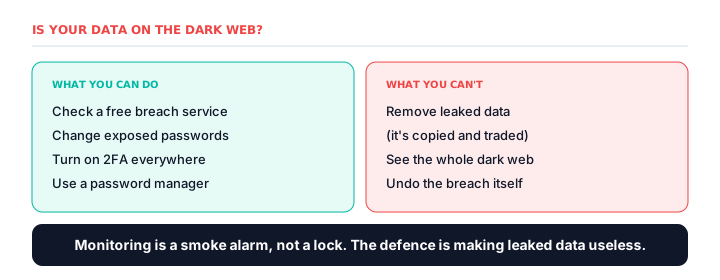
- For most people, some data is probably already leaked
- Check for free with Have I Been Pwned
- No service can remove leaked data — it's copied and traded
- Change exposed passwords and enable 2FA
- Unique passwords and 2FA make leaked data useless
“Is my information on the dark web?” is one of the most common security questions, and it has an uncomfortable answer: for most people, some of it probably is — because data breaches are constant. The useful question isn't whether, but what to do about it.
How to check safely
The free service Have I Been Pwned lets you enter your email and see whether it appears in known data breaches. Modern browsers and password managers now bundle the same breach-checking in for free. This is the core function that paid dark web monitoring services charge a subscription for — useful as an alarm, but no replacement for acting on what it finds.
What checking can't tell you
No service can see the entire dark web. “Your data wasn't found” means “not found in what we can see,” not “safe.” And nothing can remove leaked data — once it's out, it's copied and traded beyond recall — which is why you can't truly remove information from the dark web, only defuse it.
What to do if your data has leaked
- Change the exposed password immediately — and anywhere you reused it.
- Enable two-factor authentication everywhere it's offered.
- Use a password manager so every account has a unique password.
- Watch for targeted phishing that uses your leaked details to seem convincing.
- If financial data leaked, monitor accounts and consider a credit freeze.
The real protection
Because you can't un-leak data, the only real defence is making leaked data useless. Unique passwords via a manager mean one breach can't open your other accounts. Two-factor authentication means a stolen password alone isn't enough. These free habits turn a breach into an inconvenience rather than a catastrophe — which is more than any monitoring service can offer.
Frequently asked questions
How do I know if my information is on the dark web?
Use a free breach-checking service like Have I Been Pwned to see whether your email appears in known breaches. Browsers and password managers now bundle the same check in for free.
Can you remove your information from the dark web?
No. Once data has leaked it's copied and traded beyond recall — no service at any price can delete it. The realistic response is to make the leaked data useless by changing passwords and enabling 2FA.
What should I do if my data is on the dark web?
First, change the exposed password immediately to a long, unique passphrase on the breached service and on every other account where you reused it. Second, enable two-factor authentication on all important accounts, ideally with an authenticator app or hardware key rather than SMS. Third, use a password manager to generate and store a different password for each site. Fourth, review the affected account's recovery email, phone number, and connected apps, and check for forwarding rules or unfamiliar devices. Finally, watch for phishing messages that mention the breached service, monitor bank and credit card statements weekly, and if sensitive financial or identity data was exposed, place a fraud alert or credit freeze with the major credit bureaus.
Is it bad if my email is on the dark web?
It's common and usually manageable. An exposed email mainly means more spam and phishing attempts. The real risk is a leaked password, especially if reused — which unique passwords and 2FA neutralise.
Do I need to pay to check the dark web for my data?
No. Free tools like Have I Been Pwned, and the breach checks built into browsers and password managers, cover the core function. Paid monitoring mainly adds continuous watching and extras, not a fundamentally better check.